How to Plan a Cloud Migration (Without Losing Your Mind)

You know you need to move to the cloud. But you're terrified: What if we lose data? How long will this take? What if it costs more than staying on-premises? Are we picking the right provider?
In recent years, we've migrated 8 production systems to AWS, Azure, and Google Cloud. Here's what we've learned: most cloud migrations succeed. The ones that fail usually fail because of poor planning, not bad execution.
The Core Decision: Why Migrate (And When Not To)
Before you spend three months planning, answer this honestly: why are you moving?
-
Scaling faster? Cloud wins. On-prem can't match the cloud's elasticity.
-
Reducing costs? Cloud can win—but only if your on-prem system is significantly over-provisioned or you're paying for hardware you don't use.
-
Getting modern infrastructure? Cloud wins—managed databases, CI/CD, and monitoring are first-class.
-
Escaping vendor lock-in? Don't migrate to the cloud for this. You're trading one lock-in (hardware vendor) for another (AWS/Azure/GCP). It's still lock-in.
When to stay on-prem: If your system is small, stable, and cost-efficient today, migration costs often exceed any savings. If you have hard compliance requirements (HIPAA, government data residency, air-gapped networks), the cloud can work, but it adds complexity.
If migration still makes sense after this gut check, move forward.
The 4-Phase Migration Planning Framework
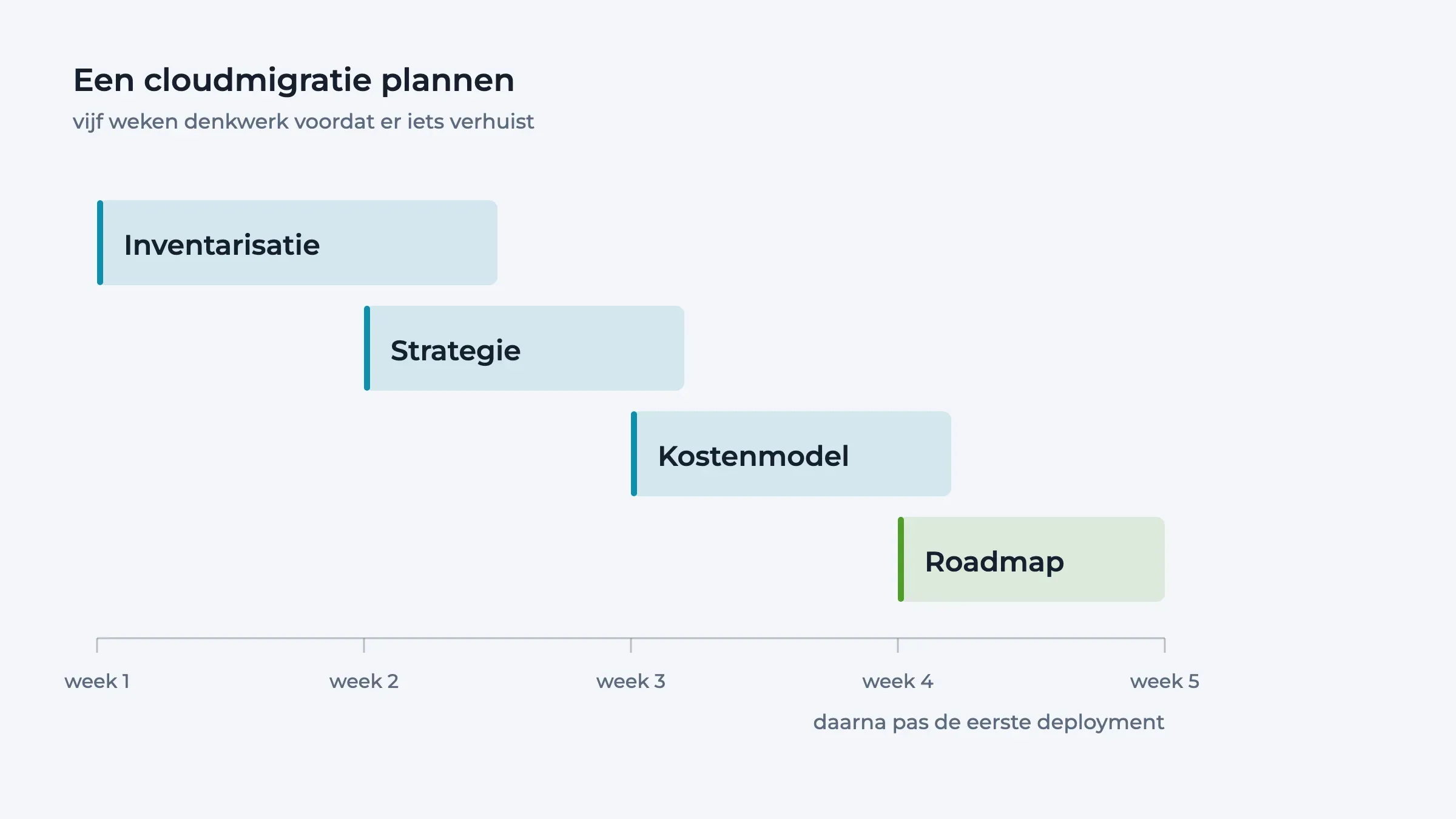
Phase 1: Inventory & Complexity Assessment (Week 1–2)
Map what you have. This takes one person, two weeks, and a spreadsheet.
-
List every system: Application, database, cache, queue, message broker, API, and scheduled job.
-
Note dependencies: Which systems call which? Is the call synchronous or async?
-
Estimate complexity: Simple REST API + Postgres = low. Monolith with 15 dependencies + real-time data + payment integrations = high.
-
Assess data volume: Small database (< 10 GB) = easy move. Large dataset (> 1 TB) = plan for network bandwidth and downtime.
Output: A one-page inventory. If it's 50+ items, your migration will take 6+ months. If it's 5–8 items, you could migrate in 3–4 months.
Phase 2: Migration Strategy Decision (Week 2–3)
Three strategies exist. Pick one:
Lift & Shift (fastest): Move as-is. Your app runs on VMs instead of physical servers. Takes 2–4 months. Minimal code changes. Problem: you don't benefit from cloud-native features (auto-scaling, managed services). You're just renting infrastructure.
Re-architect (balanced): Move and modernise. Swap on-prem database for managed RDS. Use load balancers. Add auto-scaling groups. Takes 4–6 months. Moderate code changes. You get cloud benefits and keep your core logic intact.
Refactor (best long-term): Rewrite for cloud-native. Serverless functions, microservices, and managed everything. Takes 6–12 months. Biggest code changes. Most expensive upfront. But cheapest to run, most scalable, least ops burden.
Our recommendation: Start with re-architect. It's the sweet spot—you get enough cloud benefits to justify the effort, but not so much change that you risk building new bugs.
Phase 3: Cost Modelling (Week 3–4)
Ask your cloud provider for a cost estimate. Upload your infrastructure specs, and they'll model it for you.
-
Current on-prem cost: What are you spending now? (Hardware, hosting, cooling, bandwidth, staff time running it)
-
Projected cloud cost: AWS pricing calculator. Azure pricing calculator. Google Cloud pricing calculator.
-
Break-even timeline: When does cumulative cloud cost equal your migration cost? (Migration usually runs $150K–500K depending on complexity)
If cloud costs more than staying on-prem, migration might not make sense.
Real example: We moved a client from on-prem to AWS. On-prem: $40K/year (hardware + hosting). AWS: $30K/year (with re-architect optimisation). Break-even: 18 months. But they also got 5x faster deployments and 99.99% uptime. Worth it.
Phase 4: Create a Migration Roadmap (Week 4–5)
-
Pick your first system. Start with something non-critical. A reporting tool. An internal dashboard. Something with dependencies, but not mission-critical. You'll learn the process before you touch your core product.
-
Plan a pilot migration. Actually migrate one system end-to-end. This teaches you:
-
How long does it really take (usually 2x longer than you think)
-
What breaks (and how to fix it)
-
What your team struggles with (and whether you need help)
-
Set your production migration date. After the pilot, you'll know. If the pilot took 3 weeks, give production 6 weeks + buffer. Plan for 20% of that time to be unexpected chaos.
-
Plan your cutover. This is the scariest part. The switch from old to new. Will it have downtime? (Lift & shift: maybe 2–4 hours. Re-architect: hopefully 0, with blue-green deployments. Who needs to be on call? What's the rollback plan if something breaks?
Three Mistakes That Kill Migrations
Mistake #1: Underestimating data transfer time. Moving 500 GB of data takes longer than you think, especially over the internet. Plan a week minimum. Consider database replication strategies (ongoing sync, not one-time copy).
Mistake #2: Not testing rollback. Assume something will break. Before you migrate production, you must have practised rolling back. Can you restore the old system in 30 minutes? If not, you're not ready.
Mistake #3: Migrating without clear ownership. One person needs to own the migration timeline, budget, and decisions, not by committee. One person accountable. Everything moves faster with clarity on who decides.
Next Steps
-
Do the inventory. Spend 2 hours this week listing what you have.
-
Decide on a strategy. Lift & shift, re-architect, or refactor? We usually recommend re-architecting.
-
Model the cost. Use your cloud provider's calculator. Is it worth it?
-
Plan a pilot. Pick a non-critical system and actually do it. Learn before you commit to production.
If you're planning a cloud migration and want a second set of eyes, we offer free migration assessments. We'll review your current system, estimate the complexity and timeline, and point out risks before they bite you. We've done this multiple times and know the pitfalls.
Get a free migration assessment – contact us to discuss your specific situation.

Go Cloud Native, Go Big
Revolutionise your organisation by becoming a born-again cloud enterprise. Embrace the cloud and lead the future!
Cloud & platform
Landing zones on AWS and Google Cloud, CI/CD and observability. We set it up, and we keep it running.
Read more:

In 1988 a student took down a tenth of the internet. What did we do next?
In November 1988 a student at Cornell wrote a small program to count how many computers were on the internet. A bug took...

OpenAI's AI agents broke into another company. So why are we calling it a conspiracy?
OpenAI's AI agents broke into Hugging Face, another AI company, this summer. Dwarkesh Patel called it an AI civilisation...

A $200 AI subscription delivers $14,000 of compute. But does the maths hold up?
A $200 ChatGPT Pro subscription supposedly delivers $14,000 a month of compute. That is how the screenshot goes round. I...

48 major outages in twelve months. What is going on at GitHub?
Eight hours down in a single afternoon, 48 major outages in a year, and the largest cause is capacity. On GitHub becomin...

AI-Assisted Development under GDPR, NIS2 and DORA
The moment you attach a coding agent to your codebase, you touch three regulatory regimes at once. Not because AI is sep...

Reviewing AI-Generated Infrastructure Code: What to Actually Look For
Application code that is wrong usually breaks. Infrastructure code that is wrong works. And that is exactly the problem....